
Home » Player Segmentation in iGaming: Types, Rules and Examples

Player Segmentation in iGaming: Types, Rules and Examples

Chanova grouping player profiles into new, active and VIP audiences for iGaming segmentation.

Table of contents

Player segmentation in iGaming groups casino or sportsbook players by shared behaviour, value, activity, preferences or engagement eligibility. Operators use these audiences to plan campaigns, automated journeys, VIP reviews, rewards and reporting. A useful segment has clear rules, relevant exclusions, reliable data and a defined purpose.

However, labels such as “VIP” or “inactive” do not explain what a team should do next. This guide is for CRM managers, retention teams, VIP teams and product buyers. It explains how to build an audience, check its members, manage changes and choose an appropriate action.

How Does Player Segmentation Work in iGaming?

Segmentation turns approved player information into an audience that teams can inspect and use. For example, a deposit event can contribute to a count of successful deposits during the last 30 days. An audience rule then checks that count alongside other conditions.

The workflow has five stages:

Define the purpose

Choose the campaign, journey, VIP review or report that needs an audience.

Connect the data

Identify the source records, available fields and calculation windows.

Build the rules

Combine inclusion conditions with relevant exclusions.

Preview and validate

Inspect the member count and sample players before approval.

Activate and review

Connect the approved audience to its workflow, then track membership and outcomes.

Meanwhile, the PAM, wallet, casino, sportsbook or other source system retains its original records. CRM uses approved information for audience decisions. Our guide to iGaming platform architecture explains the wider system connections.

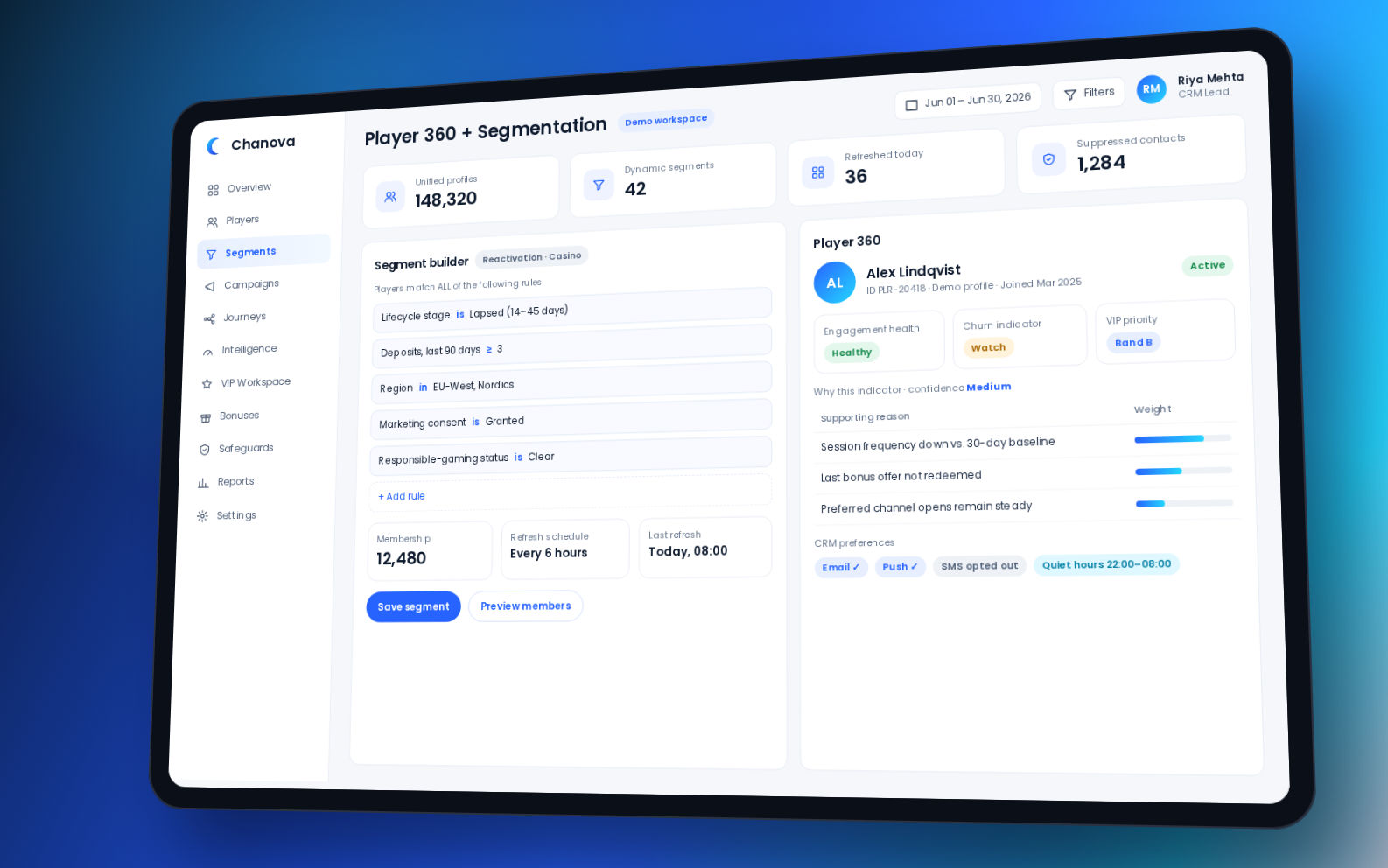
For a product example, Chanova iGaming CRM software brings player context, segmentation and lifecycle workflows together. Later sections explain which rules, refresh behaviour and controls to confirm during evaluation.
Chanova · Demo workspace
Chanova demo workspace showing a segment builder beside a Player 360 profile
Chanova Player 360 + Segmentation

Static vs Dynamic Segments: Understand the Difference

Static and dynamic describe how audience membership changes. In contrast, calculated attributes and predictive scores describe information a rule can use. Keeping these concepts separate makes the audience easier to explain.

Audience types and segmentation inputs compared
ConceptHow it worksSuitable use
Static segmentA fixed snapshot or list, changed through a deliberate edit or replacementCompetition winners, approved manual lists or one-time audiences
Dynamic segmentMembership changes when configured conditions are reassessedOnboarding, retention, reactivation or ongoing eligibility
Calculated attributeA value derived from defined events and a time windowDeposit count, active days, average stake or days since activity
Predictive audienceA segment that uses a model-generated score or classificationChurn review, reactivation potential or VIP prioritisation

Choose the update method for the task

For example, a static list is useful when membership must remain fixed for a particular activity. However, a fixed list can become outdated as players return, change permissions or become restricted. Therefore, a static audience still needs current eligibility checks before activation.

In contrast, dynamic segments suit repeatable workflows. For instance, a player can enter a new-depositor audience after a first deposit and leave after progressing further. However, “dynamic” does not mean every field updates instantly. Confirm the actual refresh method for the selected rules.

Use RFM as a defined framework

RFM segmentation combines three measures:

  • Recency: How recently the player completed a qualifying action.
  • Frequency: How often the player deposited, bet, played or engaged within the chosen period.
  • Monetary value: The defined player-value measure during that period.

For example, RFM can distinguish recently active players from previously valuable players whose activity has declined. First, define the qualifying event, window, frequency calculation and value measure. RFM organises calculated attributes and rules; it is not automatically a predictive model.

Predictive inputs need a separate review. Ask about their source signals, score meaning, confidence where available, validation and refresh process. Also confirm who reviews the result. Therefore, a score should support an operator decision rather than approve contact automatically.

Which Player Data Should You Use?

Available fields depend on connected systems, permissions and the CRM implementation. Therefore, start with information needed for the audience purpose. Adding more conditions does not make a segment more useful by itself.

Account and market context

Registration date, brand, market, currency, language, account status, verification status and product access. These fields help keep the audience within the correct operating scope.

Financial and value context

Deposit count, deposit amount, average deposit, net deposits, betting or gaming value, average stake and VIP bands. However, CRM use does not transfer ownership of the original transactions.

Behaviour and activity

Login, casino sessions, sportsbook bets, active days, session frequency, product preferences, stake patterns and inactivity. Use a clear time window so that teams can review what “active” means.

Engagement context

Campaign exposure, delivery, message responses, journey participation, recent contact, offer history, bonus engagement and gamification participation. Together, these fields help teams identify repetitive or conflicting activity.

Eligibility and protection context

Channel permission, opt-outs, suppression, self-exclusion, account restrictions, frequency limits, market rules and offer eligibility. Apply the operator’s approved controls before choosing a commercial action.

Derived values and intelligence

Calculated measures, player-health indicators, churn classifications, deposit-intent scores or VIP priorities, where supported. Before use, establish whether each field is rules-based, calculated or predictive.

For example, “active sportsbook player” is difficult to test. “Three qualifying sportsbook sessions during the last seven days” is clearer. The threshold is illustrative; the operator must define what counts as a session and which window suits the purpose.

How Do AND, OR and NOT Rules Work?

Rules determine whether a player qualifies for an audience. AND requires every condition to match. OR accepts at least one condition. NOT excludes a player when a disqualifying condition matches.

A worked sportsbook reactivation example

The following conditions illustrate rule structure, not recommended thresholds or an actual Chanova configuration:

  • All must match: Previously active, inactive for 14–30 days and within the approved brand and market.
  • At least one must match: Sportsbook preference or mixed-product preference.
  • None may match: Self-excluded, suppressed, account-restricted or already in a conflicting reactivation journey.

Use parentheses or visible rule groups to preserve those relationships. Otherwise, an OR condition could include a player who fails a required condition.

Player A: Matches the activity conditions and sportsbook preference, with no listed exclusion. The player qualifies for the audience, subject to the final action checks.

Player B: Matches the same commercial conditions but is self-excluded. Therefore, the player must remain outside this commercial audience.

Player C: Has a mixed-product preference but falls outside the inactivity window. Because the required conditions do not all match, the player does not qualify.

Before approval, inspect why each sample player is included or excluded. Also test borderline dates, recent changes and missing fields. Define how unknown eligibility data is handled; do not treat an unknown permission as approval.
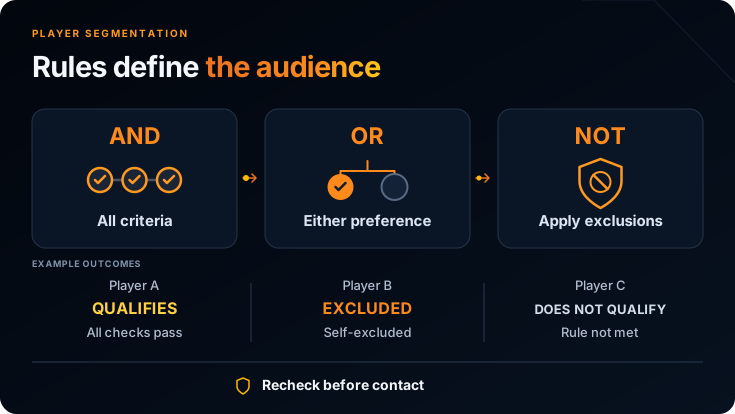
Player segmentation diagram showing AND, OR and NOT rules with three example audience outcomes

Recheck eligibility when the action runs

A player can qualify at refresh and later opt out, become restricted or reach a contact limit. Therefore, segment membership alone should not authorise communication. Recheck critical permissions and restrictions when the action executes.

Audience rules answer “Does this player belong in the group?” Execution checks answer “Can this action proceed now?” The operator must define the status owner, update path and approved response when a restriction applies.

From Audience Rules to an Approved Workflow

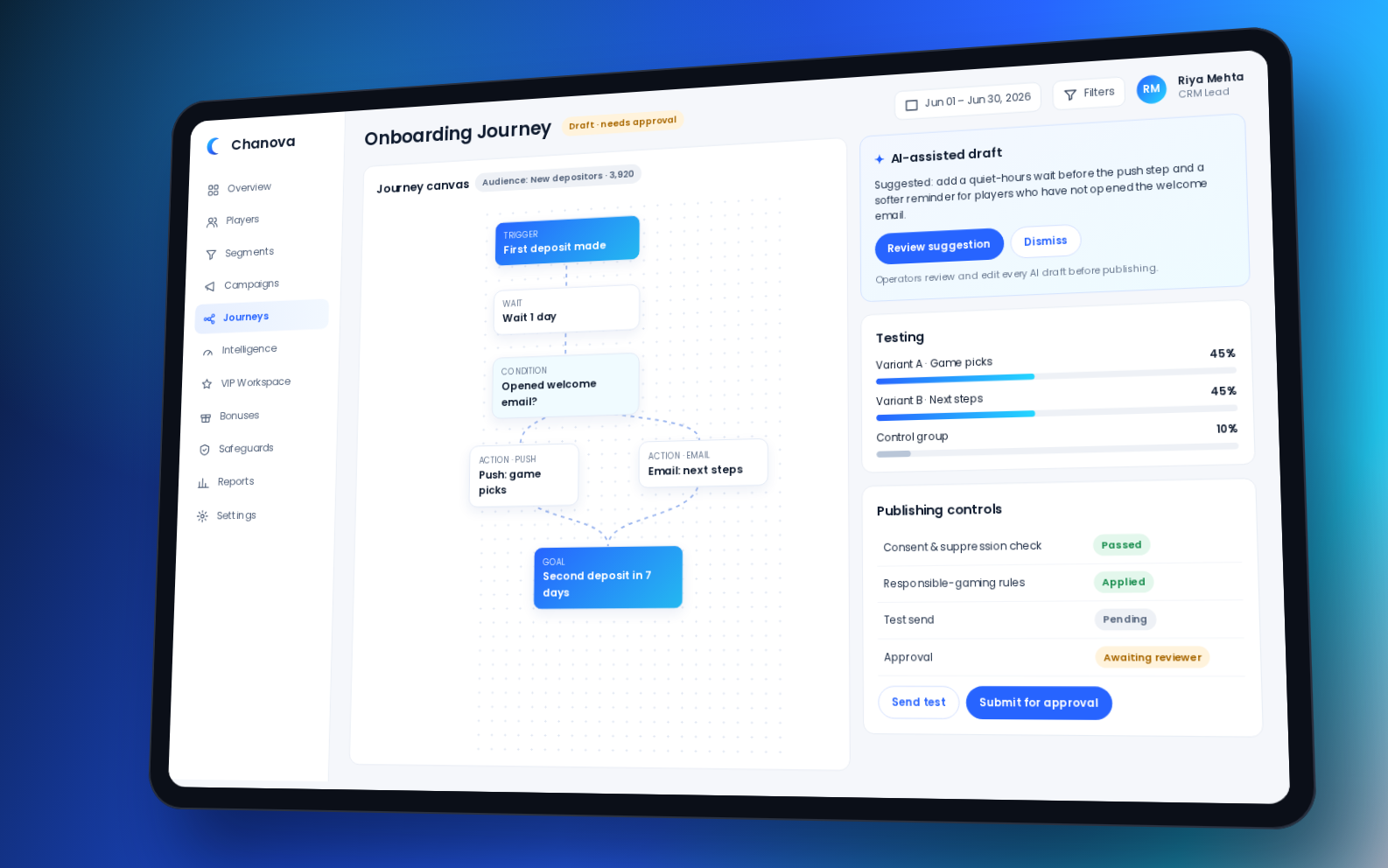
An audience determines who may enter a workflow. For example, an approved new-depositor segment can support an onboarding journey. The demo below shows how audience selection connects with testing and publishing controls.

However, choosing an audience does not approve contact. Teams still need to check current permissions, exclusions and required reviews before publishing. Also confirm how membership changes affect entry, exit and later actions.
Chanova · Demo workspace
Chanova demo workspace showing a new-depositor audience, an onboarding journey and publishing checks
Chanova Campaigns + Journeys

Manage Dynamic Membership From Draft to Retirement

Creating a rule is only the start. A controlled audience needs a clear lifecycle: draft, preview, validate, approve, activate, refresh, monitor and revise or archive.

Preview, validate and approve

First, compare the member count with the audience purpose. An unexpected count may indicate a missing condition, incorrect operator or data issue. Then inspect representative members, borderline cases, recent changes and restricted accounts.

First, assign an owner before activation. Also define approval requirements for sensitive audiences, such as VIP reviews, rewards, predictive inputs or player-protection conditions. As a result, an audience should reach campaigns, journeys or worklists only through the approved process.

Confirm refresh behaviour

Membership refresh can be event-driven, scheduled, manually triggered or a combination. Therefore, ask which method applies to each field and what latency has been validated. Test whether membership responds correctly when a time window expires, even without a new player event.

For example, a player who returns should leave an inactivity audience when the relevant conditions are reassessed. Meanwhile, restrictions may require a more immediate response. The refresh schedule and execution checks serve different purposes.
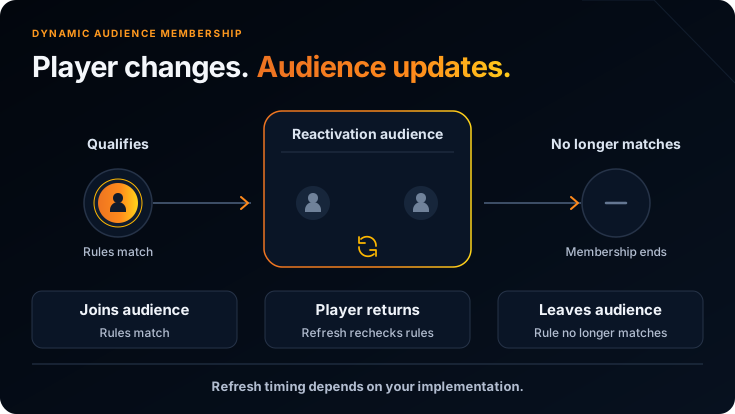
Dynamic audience membership diagram showing a player joining, returning to activity and leaving after rules refresh

Handle late, corrected or duplicate data

However, events may arrive late, be replayed, be corrected or appear twice. Confirm how the platform handles each case. For instance, duplicate deposits should not inflate a calculated count, while a corrected transaction may change value-based membership.

Also test delayed account restrictions. Where applicable, the update should remove the player from commercial audiences and stop or reroute connected activity. Ask the vendor to demonstrate the approved behaviour rather than assuming it exists.

Record changes and retire unused audiences

Entry and exit records should explain when membership changed, why it changed and which workflow responded. Similarly, rule changes need testing, version history and any required approval. This makes later investigation easier.

Also, review active audiences when products, markets, data definitions or CRM strategy change. Then revise useful segments and archive duplicates or unused lists. A practical name includes purpose, product, market, time window and version, such as “Reactivation | Sportsbook | Market A | 14–30 days | v2”.

Prevent Overlapping Audiences and Conflicting Contact

A player can qualify for onboarding, retention, VIP, cross-product and gamification audiences at the same time. Without priority rules, several workflows may contact that player independently.

Define these controls before activation:

  • Workflow priority: Specify which action takes precedence and which audiences are mutually exclusive.
  • Journey conflicts: Decide whether entry to one flow blocks another, and what happens when the original conditions stop matching.
  • Contact limits: Apply recent-contact exclusions and frequency rules across the relevant channels.
  • Human review: Decide when VIP or sensitive cases need personal attention rather than an automated action.
  • Control groups: Keep assigned control-group members outside the exposure being measured.

For example, a player may qualify for broad reactivation and a higher-priority VIP review. The approved rule could route that player to the VIP worklist and exclude them from automated reactivation. However, commercial priority must not override player-protection restrictions.

Also avoid conditions that add complexity without changing the decision. Every segment needs a clear owner, understandable rules and an action that differs from other active audiences.

Player-Segmentation Examples for Casino and Sportsbook Operators

The examples below show audience purpose, possible rules and likely activation. They are illustrative, not recommended thresholds, guaranteed outcomes or confirmed product configurations. In each case, apply the approved eligibility and overlap checks.

Onboarding and early engagement

New registrants without a deposit: Recent registration plus no successful deposit can support an approved onboarding or first-deposit journey. However, confirm contact permission and remove players once they complete the qualifying action.

New depositors: A first deposit with limited later activity can support an early-engagement workflow. Define what “later activity” means before selecting the audience.

Product-specific audiences

Active casino players: Recent casino activity plus a known game preference can support a relevant content campaign. Also check recent contact and any offer restrictions.

Sportsbook event audience: Relevant betting activity and market preference can support event-led communication within the approved region. Confirm the event timing and current contact eligibility before delivery.

Cross-product audience: Strong activity in one product with limited use of another can support approved product-discovery communication. However, check product access, preferences and competing workflows first.

Retention and reactivation

Lapsing players: Compare recent behaviour with the player’s earlier pattern, with a defined historical baseline. A meaningful decline can support retention review; one inactivity threshold will not suit every product.

Inactive players: No qualifying activity during a defined period, combined with a relevant historical condition, can support reactivation. When the player returns, review whether they should exit or move to another path.

VIP, rewards and restricted audiences

VIP review audience: Combine a value indicator with a meaningful behaviour change and recent-contact context. The next step may be a personal worklist rather than an automatic reward. Player value does not remove restrictions.

Gamification audience: Relevant behaviour and reward eligibility can support a mission or tournament invitation. Also exclude conflicting workflows and check which connected system controls the experience.

Restricted audience: Suppressed, self-excluded, account-restricted or channel-ineligible players can form an exclusion layer across workflows. However, that layer supplements current execution checks; it does not replace them.

What Should You Evaluate in Player-Segmentation Software?

A flexible rule builder is only one part of the decision. Instead, assess whether the full workflow fits your systems, teams and operating controls.

Data and definitions

Which account, gaming, financial, engagement and eligibility fields are available? Which system owns each record? Confirm calculation windows, corrections and whether useful derived values need extra engineering work.

Rule building and explanation

Can teams combine nested AND, OR and NOT conditions? Compare static and dynamic options, inspect sample members and establish why each player qualified or failed an exclusion check.

Refresh and reliability

What changes membership, and what latency has been validated? Test late, replayed, corrected and duplicate data. Also ask about large audiences, complex rules and relevant performance evidence.

Activation and safeguards

Can approved audiences feed campaigns, journeys, VIP worklists and reports? Confirm consent, suppression, self-exclusion, contact limits and overlap handling. Clarify entry, exit and failure behaviour for connected workflows.

Governance and measurement

Check owners, approvals, versions, audit records and archiving. For multi-brand operations, confirm separation of data, rules, permissions and audiences. Finally, connect audience membership and actual exposure with the intended outcome.

Ask for one complete demonstration

First, have the vendor build a realistic audience with inclusion and exclusion groups. Next, inspect a qualifying player, a borderline player and a restricted player. Then change an underlying event and review membership, entry or exit records and the connected workflow.

Also request a failure case, such as missing eligibility data or a delayed restriction. Finish by inspecting audience exposure and the chosen outcome in reporting. Delivery and clicks alone do not establish a change in player behaviour.

How Chanova Supports Player Segmentation

Chanova supports rule-based audiences using player fields, activity metrics and calculated attributes. Teams can combine AND, OR and NOT conditions and use dynamic membership or static snapshots for different tasks.

Its segmentation workflow supports membership counts, refresh, member inspection, player-level reassessment and entry or exit records. These changes can connect with campaigns and automated journeys. However, confirm the available fields, controls and activation paths for the proposed implementation.

Actual refresh behaviour depends on the source data, field and processing method. Therefore, technical discovery should establish the update model rather than assume one universal speed. Any AI-assisted insight should support operator review and follow the same eligibility rules.

Conclusion

Player segmentation in iGaming is useful when a team can explain who belongs in an audience, why they qualify and what should happen next. Clear definitions, tested rules, current eligibility checks and controlled membership changes make that decision easier to review.

Therefore, start with one audience and validate its complete workflow before adding more complexity. Chanova provides a product context for connecting segmentation with CRM activity. Evaluate the available data, refresh methods, exclusions and reporting against your own operating requirements.

Frequently Asked Questions

What is player segmentation in iGaming?

It groups casino or sportsbook players by shared behaviour, activity, value, preferences or engagement eligibility. Operators use these audiences for campaigns, journeys, VIP reviews, rewards and reporting. However, each segment needs reliable data, clear rules, exclusions and a defined purpose.

What is the difference between static and dynamic player segments?

A static segment is a fixed list or snapshot that changes through a deliberate edit or replacement. In contrast, a dynamic segment reassesses membership as configured information or conditions change. Static lists suit fixed tasks; dynamic audiences suit repeatable workflows. Both still need current eligibility checks before action.

Which player data can be used for segmentation?

Available fields may include account context, deposits, gaming or betting activity, inactivity, value, product preferences, communication history and permissions. Calculated attributes can add defined measures. However, the scope depends on connected systems and permissions; CRM does not become the owner of every source record.

How do AND, OR and NOT rules work?

AND requires every condition to match. OR requires at least one condition to match. NOT excludes players who meet a disqualifying condition. Teams can combine them in nested groups. Therefore, inspect sample members to ensure that grouping and exclusions match the intended audience.

How often should dynamic player segments update?

The right frequency depends on the purpose, source data and processing model. Updates may be event-driven, scheduled, manual or combined. Therefore, confirm the method and validated latency for each relevant field. Critical permissions and restrictions also need a check when the action runs.

How should consent, suppression and self-exclusion be handled?

Use the operator’s approved conditions as audience exclusions and final action checks. Also define which system owns each status and how updates reach the CRM. Channel permissions may differ. When an applicable restriction exists, exclude or route the player for review regardless of commercial value.

Can AI be used for player segmentation?

AI or predictive models may support classifications such as churn risk, reactivation potential or VIP priority. However, review the inputs, meaning, validation and refresh process before using the output. Predictive audiences support decisions; they do not authorise contact and must follow the same safeguards as rule-based segments.

What should operators evaluate in a segmentation platform?

Review data coverage, ownership, rule logic, derived values, refresh, member inspection, safeguards, overlap controls and activation paths. Also check governance, multi-brand separation, performance and measurement. Finally, request a demonstration that changes player data and shows how membership and connected workflows respond.

Related Articles

Chanova iGaming CRM illustration connecting player data with campaign, journey and outcome reporting.

iGaming CRM KPIs and Reporting: An Operator Guide

Automated player journey showing a player profile, timed wait and branching paths to a message or completed goal.

Automated Player Journeys in iGaming: Triggers, Branches and Examples

Chanova iGaming CRM connecting player profiles, audience segmentation and engagement journeys

What Is an iGaming CRM? Features, Uses & Buyer Guide

Need Help with Your Next Step?

Ready to Turn These Insights
Into Action?

Whether you're launching, integrating, or scaling an iGaming platform, our team can help you explore the right solution for your business.

NDA available on request.

Live at SiGMA World · Rome

Meet Pinaka in Rome. Let’s talk.

We’re presenting at SiGMA World Rome. Contact our sales team to book a meeting at the show and see our casino & sportsbook platform live.

Dates2–5 Nov 2026
VenueFiera Roma
Find usBooth H4-4014
Email sales@pinaka.game Chat on Telegram · @pinakagames Maybe later